
Deploy from GitHub
Paste a public repository and Nora runs it: a server is rented from your wallet, the repo is cloned, installed and started, and it answers on its own HTTPS address. The Logs panel streams every line while it happens.
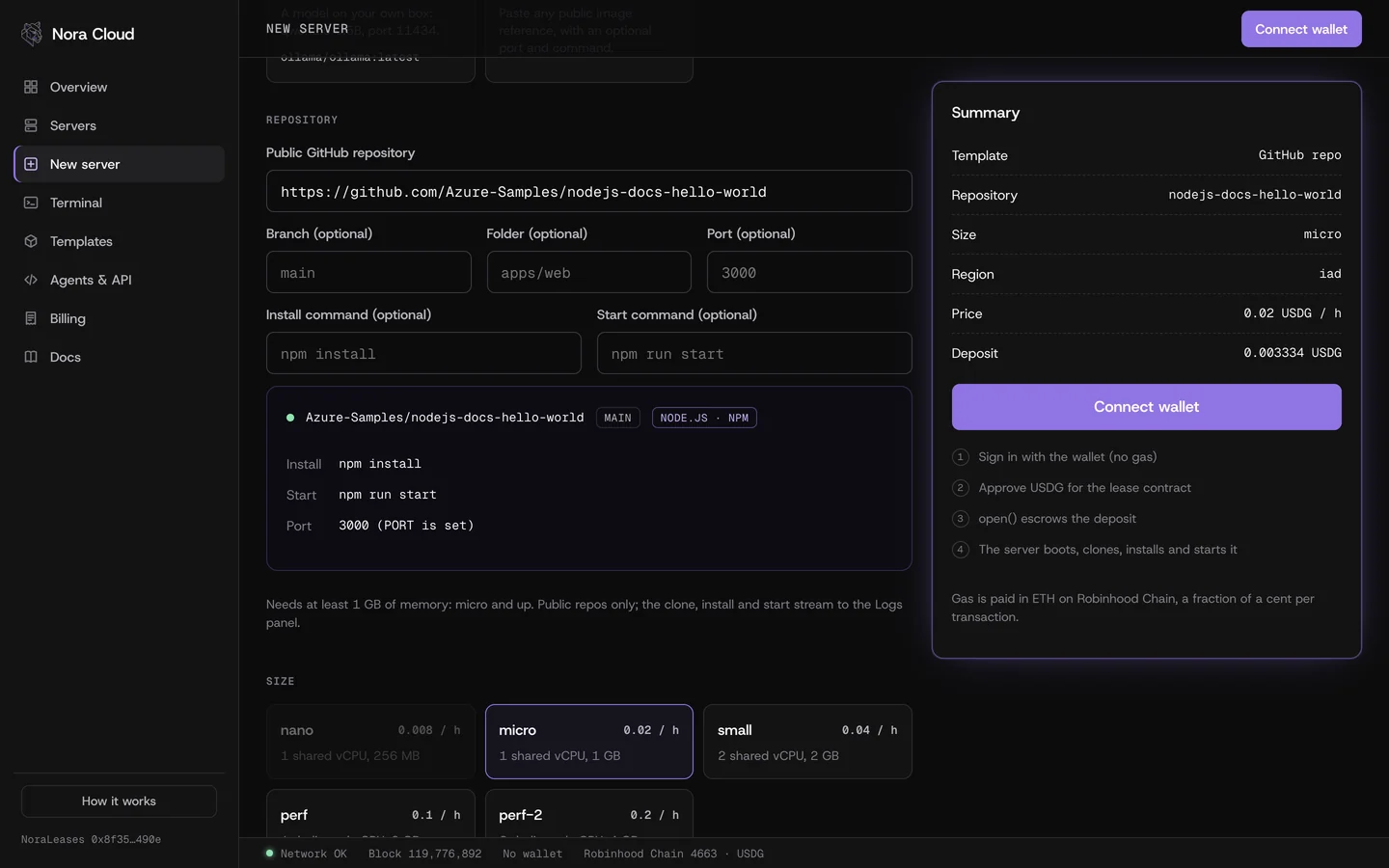
From the app
- Open New server and pick GitHub repo.
- Paste the address, for example
https://github.com/owner/repo. A branch, a sub-folder, the port and your own install and start commands are optional. - Nora reads the repo before you pay and shows what will run: the package manager from the lockfile, the build and start commands and the port. If the repo is private, missing or the branch does not exist, it says so and nothing is paid.
- Pick a size (micro or bigger, installs need at least 1 GB of memory), a region and how long to prepay, then confirm the approve and
open(). - The server page opens. The Logs panel shows the clone, the install and your app's output, and prints
[nora] the app answers on port …once it is up. Open the HTTPS address next to it. - Pushed a new commit? Press Redeploy next to the address. See Redeploy.
How Nora runs a repo
The server is the Agent box image (Debian 12 with Node 22, Python 3, git and curl). A fixed boot script makes a shallow clone of the repo (depth 1, the branch you chose) into /srv/app, moves into the folder you gave, then picks the first rule that matches:
| The repo has | Install | Start |
|---|---|---|
| package.json + pnpm-lock.yaml | pnpm install --frozen-lockfile | pnpm run start |
| package.json + yarn.lock | yarn install | yarn run start |
| package.json + bun.lock | bun install | bun run start |
| package.json + package-lock.json | npm ci | npm run start |
| package.json, no lockfile | npm install | npm run start, else node on main, server.js, index.js, app.js |
| requirements.txt or pyproject.toml | pip install -r requirements.txt (or pip install .) in /srv/venv | Procfile web, manage.py runserver, uvicorn main:app, gunicorn app:app, flask run, python app.py |
| index.html only | none | python3 -m http.server $PORT |
- A
buildscript in package.json runs after the install. PORTis set to the port you chose, or to the detected default: 3000 for Node, 8000 for Python, 8080 for a static site. Your app must listen on0.0.0.0(or all interfaces) on that port.- Your own install command replaces the install and build steps; your own start command replaces the start.
- Env vars you add are passed to the app at boot, as with every template.
- If something fails, the logs say which step and the server stays up, so you can open the terminal (it starts in
/srv/app) and fix it by hand. The meter runs as usual until you close the lease.
Your repo URL, branch, folder and commands reach the server as environment variables read by that fixed script. They are never pasted into a shell command by Nora, and the URL is checked against https://github.com/<owner>/<repo> before anything boots.
Redeploy
The Redeploy button on the server page ships the latest commit to the same server, without a new lease. The server runs a fixed script written at boot, which:
- fetches the latest commit of the branch the server runs (depth 1); if that fails, the running app is left as it is;
- stops the app;
- runs the install again only if the committed package or lock files changed (
package.json, the lockfile,requirements.txt,pyproject.toml), or always when you set your own install command; - runs the build script if there is one, then starts the app on the same port.
Every step streams in the Logs panel, from [nora] redeploy r… started to [nora] redeploy r… done in N s, or failed with the step that broke. A failed redeploy leaves the server up with the terminal working, and you can press Redeploy again after a fix. One redeploy runs at a time. Nothing in the request reaches a shell: the API only asks the server to run that script.
The same from an agent: POST /api/v1/leases/{id}/redeploy, box.redeploy() in the SDK, node nora.mjs redeploy <lease> and the redeploy MCP tool. Servers deployed before Update 2 (2026-11-22) do not have the script: deploy the repo on a new server.
What is not supported yet
- Private repositories: the clone runs without credentials, so only public repos work.
- Building a Dockerfile. A repo that only has a Dockerfile can still run with your own install and start commands, or publish its image and use the Any public image template.
- Redeploy on push. Redeploy is a button and an API call; nothing listens for GitHub webhooks, so a push alone does not ship.
The deploy starts when the app (or your agent) calls boot right after open(). If nothing calls boot within about 75 seconds, the keeper boots the default Ubuntu box for the lease instead, without the repo. You can still use it from the terminal, or close it and get the unused USDG back.
From an agent
The same deploy, from the SDK, the CLI or the MCP server. Details in Agents API, SDK and MCP.
import { Nora } from "./nora.mjs";

const nora = new Nora({ privateKey: process.env.NORA_KEY });
const app = await nora.deploy({ repo: "https://github.com/owner/repo", size: "micro", minutes: 60 });
console.log(app.url);                 // answers once ready is true
console.log((await app.logs()).lines.map((l) => l.text).join("\n"));
await app.stop(); // close(), server deleted, unused USDG refundedNORA_KEY=0x... node nora.mjs deploy https://github.com/owner/repo --size micro --minutes 60
NORA_KEY=0x... node nora.mjs logs <lease> --followOver HTTP, check the repo for free, then boot a paid lease with the GitHub template and read its logs:
curl -s "https://www.noracloud.xyz/api/v1/github/check?repo=https://github.com/owner/repo"

curl -s -X POST https://www.noracloud.xyz/api/v1/leases/42/boot -H "authorization: Bearer $TOKEN" \
  -H 'content-type: application/json' \
  -d '{"template":"github","repo":"https://github.com/owner/repo","branch":"main","dir":"","port":3000}'

curl -s "https://www.noracloud.xyz/api/v1/leases/42/logs?since=<cursor>" -H "authorization: Bearer $TOKEN"

curl -s -X POST https://www.noracloud.xyz/api/v1/leases/42/redeploy -H "authorization: Bearer $TOKEN"